
How to Use Kling 3.5 for AI Video Generation: Complete Tutorial & Tips
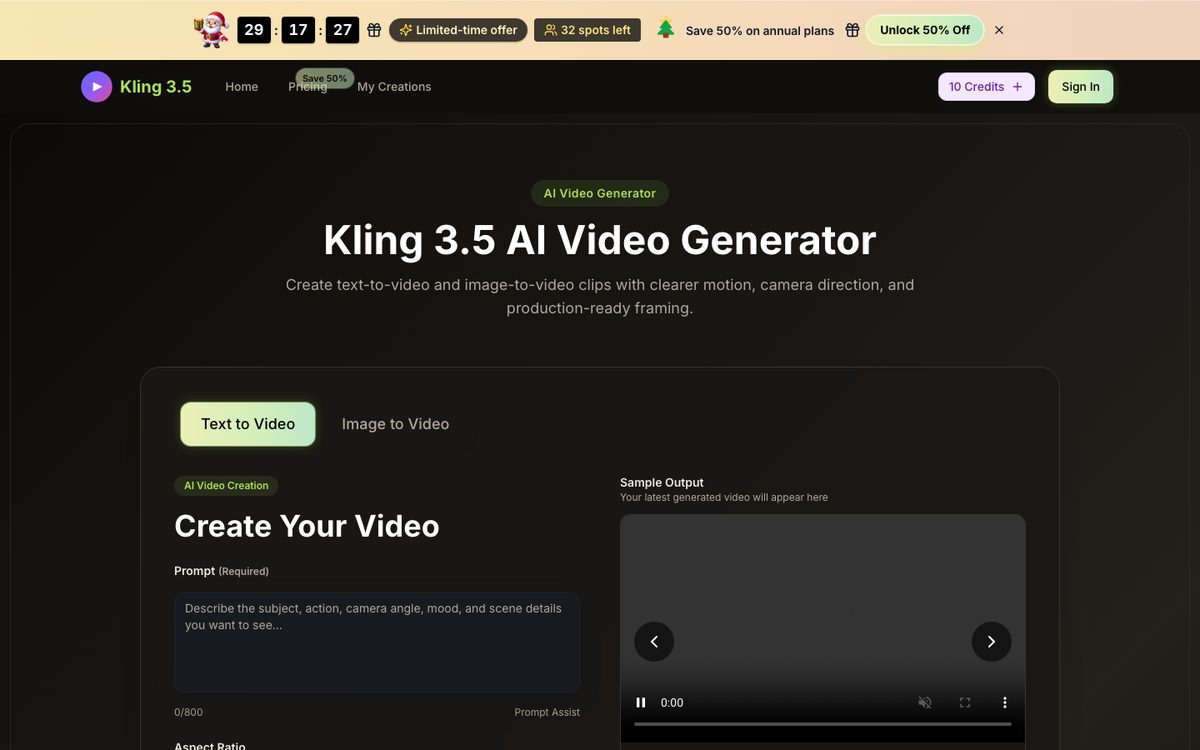
Visit Kling 3.5 — Kuaishou's latest AI video generation tool.
Reference: https://www.kling35.org
Today I'm breaking down Kling 3.5 — the model that's been shaking up the AI video world.
If you haven't heard of Kling 3.5 yet — in short, it's the latest video generation model from Kuaishou's AI team, pushing AI video generation to new heights. Everyone was still focused on Kling 3.0 and discussing Seedance 2.0, and then Kling 3.5 quietly emerged with comprehensive upgrades in image quality, camera control, and physics realism — a true "all-around champion."
I spent a full week deeply testing it. Today I'm sharing all the details, real-world performance, hidden tips, and pitfalls to avoid in one go!
TL;DR: Strong in both text-to-video and image-to-video, 1080p/10-second output, camera control precise enough to be a "director," and significantly cheaper than competitors. Verdict: The most值得上车的 AI video tool in 2025, bar none.
What Is Kling 3.5 and Why Is It Trending?
One-Line Definition
Kling 3.5 is a next-generation AI video generation model developed by Kuaishou's AI team, supporting text-to-video and image-to-video modes. Use it directly in your browser — no software installation needed.
Core Philosophy: Everyone Can Be a Director
| Traditional Approach | Kling 3.5 Approach |
|---|---|
| Need to learn AE/Premiere and other professional tools | Open browser, type, and generate video |
| Shooting requires actors, equipment, locations | AI generates visuals directly, zero-cost experimentation |
| One ad video takes 3-7 days to produce | 5-10 minutes to output, regenerate if unsatisfied |
| One revision means reshooting | Just edit the prompt, iterate endlessly |
Key Specs
| Specification | Kling 3.5 |
|---|---|
| Generation Modes | Text-to-video, Image-to-video |
| Max Quality | 1080p Full HD |
| Video Length | 5s / 10s |
| Aspect Ratios | 16:9, 9:16, 4:3, 3:4, 21:9, 1:1 |
| Prompt Limit | 800 characters (with Prompt Assist) |
| Watermark | No watermark on paid plans |
| Commercial License | Included with paid plans |
| Platform | Browser online (no install needed) |
| Pricing | From $9.9/month (50% off annual) |
Kling 3.5 Key Upgrades: Three Game-Changers
Upgrade 1: Camera Control — From "Lottery" to "Director"
The biggest pain point with earlier AI video tools? Uncontrollability! You write "a cat jumps on a table" and the AI does whatever it wants. Kling 3.5 eliminates this entirely:
- Push in/Pull out: Specify camera push-in or pull-back
- Pan/Tracking: Horizontal/vertical camera movement
- Orbit: Rotate around the subject
- Locked-off: Fixed frame, subject moves
In other words, AI video used to be a lottery; Kling 3.5 makes you a director. You can precisely describe camera movements, and the generated video follows your instructions.
For example, I tested this prompt:
"A luxury watch on a marble surface, camera slowly pushes in, soft lighting, 60fps smooth motion"
The result was a slow push-in with natural light transitions — a week ago I wouldn't have believed this was AI-generated.
Upgrade 2: Physics Realism — No More "Floaty" Feel
AI video has always been criticized for not understanding physics — objects floating, figures distorting, weird lighting. Kling 3.5 made major improvements here:
- Physics-aware motion: Walking, objects falling, water flow — all more realistic
- Face preservation: Facial consistency greatly improved, no more "五官乱飞"
- Smooth keyframe transitions: No sudden frame skipping during motion
Upgrade 3: Image-to-Video — Bringing Static Images to Life
Upload a product photo, a design mockup, or a portrait — Kling 3.5 adds motion:
- Product showcase: Product photo → auto-generated demo video, perfect for e-commerce
- Creative concepts: Design draft → dynamic preview, ideal for client pitches
- Portrait animation: Static portrait → subtle movement, great for social media
Real test: Uploaded a watch product photo with prompt "camera orbits around the watch, soft reflections" — the result was ready to use as an e-commerce hero video. Efficiency maxed.
Kling 3.5 vs Competitors: Head-to-Head Comparison
| Dimension | Kling 3.5 | Happy Horse 1.0 | Seedance 2.0 | Sora |
|---|---|---|---|---|
| Text-to-Video | ✅ 1080p/10s | ✅ Open-source, commercial | ✅ High quality | ✅ Up to 60s |
| Image-to-Video | ✅ Perfect support | ❌ Not supported | ⚠️ Limited support | ✅ Supported |
| Camera Control | ✅ Precise control | ❌ Minimal control | ⚠️ Limited | ❌ Minimal control |
| Physics Realism | ✅ Excellent | ✅ Excellent | ✅ Excellent | ✅ Excellent |
| Ease of Use | ✅ Browser ready | ⚠️ Needs deployment/hardware | ❌ Requires API | ❌ In beta |
| Price | ✅ From $9.9/mo | ✅ Free, open-source | ⚠️ API usage-based | ❌ Unknown |
| Commercial License | ✅ Included (paid) | ⚠️ Needs confirmation | ✅ Included | ❌ Not available |
| Chinese Support | ✅ Native | ❌ Mainly English | ✅ Supported | ❌ Mainly English |
| Generation Speed | ✅ Fast (~2 min) | ⚠️ Needs high-end GPU | ⚠️ Long queues | ❌ Very long queues |
Verdict:
- Best value → Kling 3.5 (from $9.9, browser ready, commercial license)
- Best open-source → Happy Horse 1.0 (requires your own GPU)
- Longest videos → Sora (but inaccessible to most)
- API integration → Seedance 2.0 (for developers)
Hands-On Tutorial: Get Started in 30 Minutes
Here's a step-by-step guide from signup to your first video.
Step 1: Open the Website
Open in your browser — no download or installation needed. Works on Mac, Windows, and mobile.
Step 2: Create an Account
Enter email → Set password → Verify email → Done
New users get free credits to try it out. Test with free credits before deciding on a paid plan.
Step 3: Choose Your Mode
Two entry points:
| Mode | Best For | Example Prompt |
|---|---|---|
| Text to Video | Creating from scratch | "Cinematic drone shot flying over misty mountains at sunrise" |
| Image to Video | Animating existing images | Upload product image + "camera slowly zooming in" |
Step 4: Prompt Writing Tips
After testing 50+ prompts, here's the golden formula:
[Subject] + [Action] + [Camera Movement] + [Atmosphere/Lighting] + [Quality]
❌ Bad: "a cat" → Result: Random cat, random action, random quality
✅ Good: "An orange tabby cat jumping off a sofa, slow motion, camera tracking the jump, warm afternoon lighting, 1080p" → Result: Orange tabby, jumping off sofa, slow motion, tracking shot, warm lighting
Proven prompt templates:
Product showcase:
"Product shot of [product name] on a minimalist white pedestal, camera rotating 360 degrees slowly, soft studio lighting, shallow depth of field, 1080p"
Landscape:
"Aerial drone view flying over [scene], golden hour lighting, mist rising, cinematic color grading, 16:9 widescreen"
Character action:
"A person walking down a rainy city street at night, neon reflections on wet pavement, camera follows from behind, cinematic mood, 1080p"
Step 5: Settings
| Parameter | Recommendation |
|---|---|
| Duration | 5s (testing) / 10s (final output) |
| Quality | 1080p (final) / 720p (quick test) |
| Aspect Ratio | 16:9 (landscape) / 9:16 (short video platforms) |
| Generation count | Run same prompt 2-3 times, pick the best |
Step 6: Download
Preview and download directly. Annual subscribers get no watermark, unlimited downloads, and commercial license.
Who Is Kling 3.5 For?
Highly Recommended
| User | Why |
|---|---|
| E-commerce/store owners | Product images → showcase videos, batch generate in 5 minutes, save production costs |
| Short video creators | 9:16 vertical output, publish directly to Douyin/TikTok/Reels |
| Marketers/advertisers | Rapid concept video production for client pitches, replaces traditional mood boards |
| Social media managers | Batch produce visual content, maintain posting frequency |
Worth Trying
| User | Notes |
|---|---|
| Film/TV professionals | Useful as inspiration tool or pre-visualization, but 10s limit unsuitable for final cuts |
| Game developers | Quickly generate concept videos, but can't replace professional tools |
Not Recommended
| User | Reason |
|---|---|
| Need long videos (>10s) | Max 10s, use other tools to拼接 for longer content |
| Need 4K output | Max 1080p, 4K not yet supported |
| Zero budget | Free credits limited, paid plan needed for regular use |
Pricing Analysis: Is It Worth It?
Kling 3.5 is currently running a 50% flash sale on annual plans:
| Plan | Annual Price | Monthly Credits | Monthly Output | Cost per 100 Credits |
|---|---|---|---|---|
| Basic | $9.9/month | 800 credits | ~80 videos | $1.24 |
| Professional | $19.9/month | 2,000 credits | ~200 videos | $0.99 |
| Enterprise | $49.9/month | 6,000 credits | ~600 videos | $0.83 |
Real usage reference:
- One 720p/5s video ≈ 10 credits
- One 1080p/10s video ≈ 30-40 credits
- Professional plan: 200 videos/month, plenty for individual creators
Compared to competitors:
- Happy Horse 1.0: Free and open-source, but you need an H100 ($30+/hour rental)
- Seedance 2.0: API usage-based pricing, higher cost for batch use
- Runway Gen-3: From $15/month, but quality and control fall short of Kling 3.5
Verdict: At comparable quality, Kling 3.5 offers the lowest price, the lowest barrier to entry, and the most hassle-free commercial licensing.
Final Verdict: Pros and Cons
Pros
- Camera control is a game-changer — Among all current AI video tools, Kling 3.5 has the strongest camera controllability, significantly reducing the "lottery" feel
- Browser ready, zero门槛 — No software to install, no GPU to rent, no environment to configure — open a browser and go
- Unbeatable value — From $9.9/month with commercial license, competitors are either more expensive, lack commercial use, or require high-end hardware
Current Limitations
- Max 10 seconds — Need to拼接 for longer videos, slightly inconvenient
- Max 1080p — No 4K option, may not suffice for large-screen投放
- Peak hour queues — Free users may experience wait times during peak hours
My Recommendation
If you're in e-commerce, short video, or social media content: No-brainer — the time and cost savings from this tool will pay for itself quickly.
If you're a film/TV professional: Use it as an inspiration and pre-visualization tool, but it can't replace professional post-production.
Final Thoughts
Kling 3.5 marks the beginning of the "controllable era" in AI video generation. No longer a "lottery" — now you can truly "direct" the output you want.
Fast, high-quality, and affordable. If you haven't started with AI video yet, Kling 3.5 is the best place to begin.
Questions? Drop them in the comments!
Reference links:
- Kling 3.5 Website: https://www.kling35.org
- Original content. Please credit if republished.
Disclaimer: This is an independent review. Kling 3.5 is a product of Kuaishou's AI team. This site is a recommendation/tutorial site, not directly affiliated with the official product.